 ~/onflow.studio/radio-flow
Radio Flow
Deep-work music one click away, in your menu bar.
No browser tab to lose, no autoplaying video, no account. Click the equalizer and get in flow.
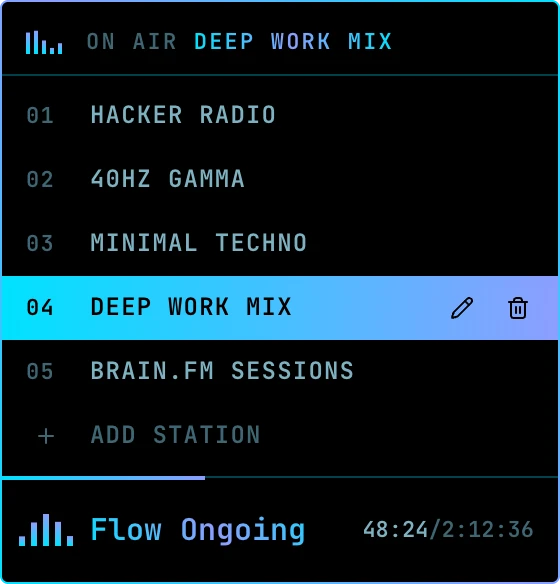
The panel hangs from the menu bar. Pick a station, it closes and stays out of your way.
# why
Focus music shouldn't live in a tab.
The tab gets closed, buried under forty others, or turns into “just one video”. Radio Flow puts the music somewhere it can't distract you: a tiny equalizer in the menu bar.
# what you get
01
Five stations, ready to go
A live hacker radio, 40hz gamma, minimal techno, a deep work mix and focus sessions. Pick one, the panel closes, the music stays.
02
Add your own
Paste any YouTube video, live stream or playlist link. Radio Flow names the station from the video's title.
03
Picks up where you left off
Each station remembers its spot, even after you quit or restart. Playlists keep their shuffled order.
04
An icon that shows what's on
The equalizer holds still when stopped and bounces while music plays, so you can tell at a glance.
05
Always know where you are
The play bar shows elapsed time and length, or LIVE for streams, with a progress line glowing along its edge.
06
Quiet by design
Nothing touches YouTube until you press play. No dock icon, no window, no account, no telemetry.
# keyboard
Keyboard first, mouse optional.
Open the panel and drive it without leaving the keys. Renames and removals ask before they happen.
- clickOpen or close the panel
- ↑↓Move between stations
- enterTune in, play or pause
- eRename a station
- deleteRemove a station
- escClose the panel, keep the music
# install
- 1.
Download Radio.Flow-*-arm64-mac.zip from the latest release and unzip it.
- 2.
Move Radio Flow.app to /Applications.
- 3.
The app isn't notarized by Apple, so macOS blocks the first launch. Clear the download flag once:
$ xattr -dr com.apple.quarantine "/Applications/Radio Flow.app" - 4.
Open it. The equalizer appears in your menu bar. Right-click it and tick Open at Login to keep it there.
# how it works
A small Electron app. The panel is a React page in a frameless window that only ever hides, so the music keeps playing while it's closed. Audio comes from the official YouTube IFrame player, so ads, terms and creators all stay in the loop.
Your stations and the spot each one stopped at are saved to one file in your Library folder. That file is the only thing it stores, and it never leaves your Mac.
# coming next
Stations, shared.
- >Anonymous shared stations, added to a common pool.
- >A random row that streams a station from the shared pool.
- >One click to keep the ones you like.
# origin
Radio Flow started as the radio built into the status line of email-flow. It got so much use that it moved out to the menu bar to play alongside everything else.