~/onflow.studio/ci-flow
CI Flow
Run GitHub Actions on a spare machine and watch it from anywhere.
The laptop in the drawer becomes your CI. Open source, MIT.
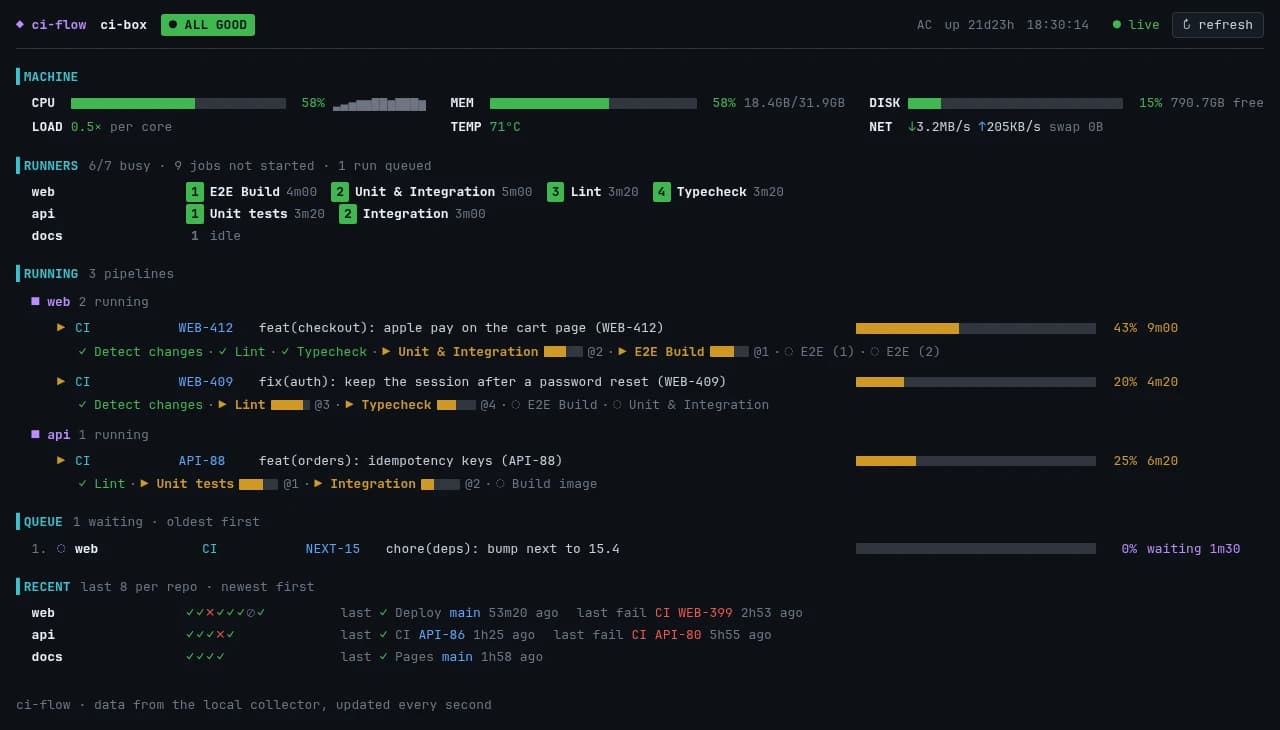
cimon: the machine, its runners, what's running and what just finished, on one screen.
# why
CI minutes run out. Old laptops don't.
A spare machine is warm and already paid for. CI Flow gives it clean runners, a dashboard and no open ports. No Kubernetes, no cloud account.
# what you get
01
Your hardware, your minutes
No per-minute bill, warm caches. GitHub stays your CI.
02
A fresh runner per job
Its own container and Docker daemon, cleaned when the job ends.
03
cimon, in the terminal
Machine health, runners, pipelines and results, live.
04
The same view on your phone
A web page on your tailnet. No login to set up.
05
Alerts when it matters
Runner down, disk full, too hot: a push to your phone.
06
Nothing public
The machine only talks out to GitHub.
# on your tailnet
Check CI from your phone.
Same view as cimon, live, shared only on your tailnet.
# security
A runner runs what the workflow says.
On a public repository, a fork's pull request can change it. Before you add one:
- 1.Require approval for fork pull requests.
- 2.Keep forks off the runner with one if: line.
- 3.ci-flow warns you when a repository is risky.
# install
One command plans it all.
On the spare machine. Without --yes it only prints the plan. You'll need:
- A spare Linux machine with sudo
- Tailscale, and gh logged in
- Python 3
Then, in the repository's workflows: runs-on: [self-hosted, ci-box].
$ git clone https://github.com/onflow-studio/ci-flow$ cd ci-flow$ ./ci-flow init # the plan$ ./ci-flow init --yes # do it$ ci-flow add you/repo --runners 2 --labels ci-box$ ci-flow applyOn a fresh machine, init:
- 1.Installs Docker, Tailscale and gh if missing.
- 2.Keeps the runners up with nobody logged in.
- 3.Stops a closed laptop lid from suspending it.
- 4.Cleans old images every week.
# stack
ci-flow --stack
- lang
- Python, standard library only
- runs
- systemd · Docker · GitHub's runner
- reach
- your tailnet only
- tests
- run on ci-flow itself
# how it works
Each runner slot is a Docker daemon plus a fresh runner container per job. When the job ends, the slot is wiped.
One collector watches the machine and GitHub. cimon and the web page both read it.
# origin
Hand-made runners on a spare laptop, kept busy by Shogun Flow's agents. The copies drifted, so they became one tool. Its own tests run on it.
# make it yours
Fork it, make it yours.
Don't adapt to it: fork it and have your AI make it work your way. Next up: several machines sharing the load.