 ~/onflow.studio/usage-flow
Usage Flow
Claude Code and Codex limits at a glance, in your menu bar.
No dashboard to open, no /usage to type, no surprise at 100%. Look up and stay in flow.
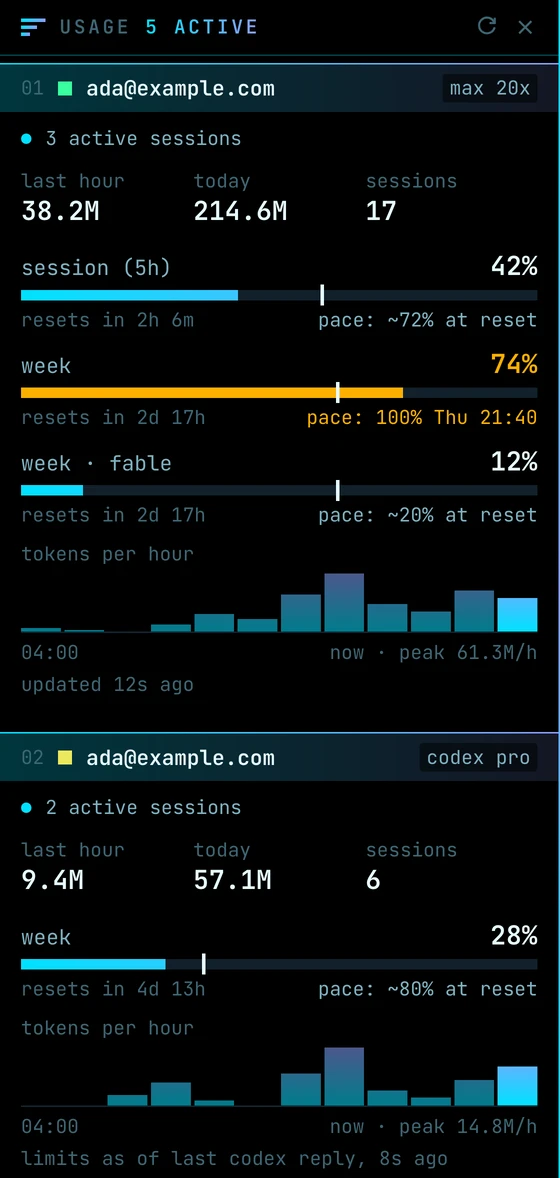
The panel hangs from the menu bar and runs the full height of the screen. One account per band, every limit in reach.
# why
Limits only show up when you hit them.
The session window runs out in the middle of a refactor, the weekly one two days before it resets, and the only way to see either coming is to stop and ask. Usage Flow keeps every account's limits where a glance finds them: a small gauge in the menu bar, and a panel with the detail when you want it.
# what you get
01
Every account, side by side
Each Claude Code login on your Mac, from ~/.claude and any ~/.claude-* folder, plus Codex, found on their own. Take one off the panel or sign a new one in from the menu.
02
Limits with a pace
Session and weekly windows as bars, with a tick for how much of the window has passed and a projection: pace: ~72% at reset, or the time you'd hit 100%.
03
An icon that shows what's on
One bar per account in the menu bar, filled as far as its fullest limit. It turns amber at 70% and red at 90%.
04
What you're burning
Tokens in the last hour and today, sessions running right now, and a 12-hour chart per account, read from local transcripts.
05
A heads-up before the wall
A notification at 80, 90 and 100% of a limit, and when a session or week resets.
06
Sticks to a side
The panel docks to the left or right edge of a display, full height, and sizes its content to the room it has. Drag it anywhere and it snaps to the nearer side.
07
Room of its own
Tick Keep Windows Clear of the Panel and other apps' windows move out from under it, as if the panel were part of the screen's edge.
08
Settings in the menu
Click the gauge for the panel, accounts, menu bar figures, alerts, always on top, all desktops, side and open at login.
09
Quiet by design
No account, no telemetry, no Dock icon. It only talks to the services you already use.
# install
- 1.
Download Usage.Flow-*-arm64-mac.zip from the latest release and unzip it.
- 2.
Move Usage Flow.app to /Applications.
- 3.
The app isn't notarized by Apple, so macOS blocks the first launch. Clear the download flag once:
$ xattr -dr com.apple.quarantine "/Applications/Usage Flow.app" - 4.
Open it. The gauge appears in your menu bar and the panel on the left edge of your screen. It opens at login from then on; click the gauge to turn that off.
# stack
usage-flow --stack
- lang
- Rust 99%
- stack
- egui · native macOS menu bar and Accessibility
- talks to
- Anthropic's usage endpoint, with the login Claude Code already keeps
- reads
- Claude Code and Codex transcripts on your Mac
- stores
- settings and the last reading, in Application Support
- runs on
- macOS, Apple Silicon · no server, no account, no telemetry
# how it works
A small native app written in Rust with egui, with no server and no account of its own. Claude Code limits come from Anthropic's usage endpoint, asked every 10 minutes with the login Claude Code already keeps in your Keychain. The token is read fresh each time and never stored or sent anywhere else.
Codex limits come from the snapshots Codex writes into its own session logs, so they're as fresh as its last reply. Token counts, sessions and the hourly chart are read from the transcripts both tools keep on your Mac. Settings and the last reading are saved to one folder in your Library, and it never leaves your Mac.
# origin
Usage Flow started as a personal monitor for a couple of Claude Code accounts. Codex joined, the panel stayed open all day next to Radio Flow, and it took the same look to sit beside it.
# make it yours
Fork it, make it yours.
Usage Flow is free for macOS on Apple Silicon, with the source alongside it. Like everything here, it was shaped around one way of working. Don't adapt to it: fork it and have your AI make it work your way.